Webhook Triggers in the KubeRocketCI Portal
The Webhook Triggers section of the KubeRocketCI portal shows the Tekton Triggers resources that turn a Git webhook into a pipeline run. Use it to find out which resources react to a pull request or a merge, which pipeline they start, and which parameters they pass to it.
To open the section, navigate to Configuration and select a page in the Webhook Triggers group of the side menu: Event Listeners, Triggers, Trigger Templates, Trigger Bindings, Interceptors, or Cluster Interceptors. Each page shows one resource type.
The section is read-only. You can browse resources and view their YAML, but you cannot create, edit, or delete them in the portal. Developers have read-only access to Tekton resources in the platform namespace. To change them, see Add Custom Tekton Triggers.
How the Resources Work Together
When a Git server sends a webhook, the resources process it in the following order:
- An Event Listener receives the webhook on its HTTP endpoint and passes it to every Trigger it references.
- The Trigger runs its Interceptors in sequence. They validate the payload and filter out events the pipeline should not react to. The KubeRocketCI interceptor also adds the
CodebaseandCodebaseBranchdata to the event. - If the event passes all interceptors, the Trigger Binding maps fields of the webhook payload to parameters.
- The Trigger Template uses these parameters to create a Tekton
PipelineRun.
The portal links these resources to each other, so you can move from one resource to the resources it uses and the resources that use it.
Triggers
A Trigger is a reusable bundle of interceptors, bindings, and a template that one or more Event Listeners can reference. Open Webhook Triggers -> Triggers to view the list. The Search field, the Namespaces filter, and the Columns button work the same way on all list pages.
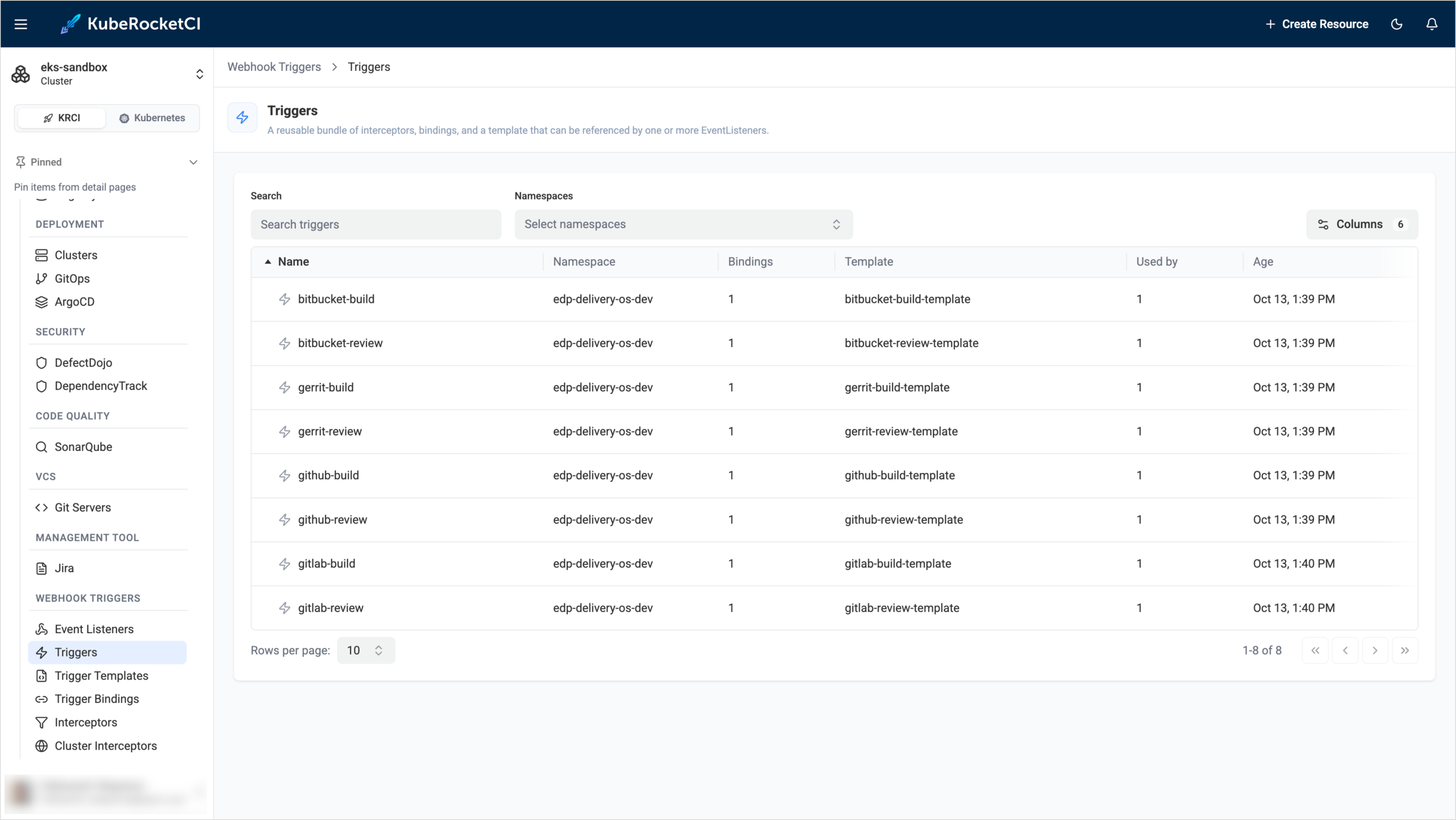
The list contains the following columns:
| Column | Description |
|---|---|
| Name | The Trigger name. For example, github-build runs the build pipeline after a pull request is merged, and gitlab-review runs the review pipeline for a merge request. The platform provides Triggers for each supported Git server, such as bitbucket-build, gerrit-review, and github-build. |
| Namespace | The namespace of the Trigger. |
| Bindings | The number of Trigger Bindings the Trigger uses. |
| Template | The Trigger Template that creates the pipeline run. |
| Used by | The number of Event Listeners that reference the Trigger. |
| Age | The date and time the Trigger was created. |
To find a Trigger, type its name in the Search field. If you have access to more than one namespace, use the Namespaces filter to show Triggers from specific namespaces only. To show or hide columns, click Columns.
Click a Trigger name to open its details. The Overview tab contains the following sections:
- Metadata: The creation date and the labels of the Trigger.
- Bindings: The Trigger Bindings the Trigger uses.
- Template: The Trigger Template the Trigger uses.
- Interceptors: The interceptors the Trigger runs, in the order they run, with their parameters. For example, the
github-buildTrigger uses the cluster interceptorgithubto validate the webhook secret and accept onlypull_requestevents, and the cluster interceptorcelwith the filterbody.action in ['closed'] && body.pull_request.merged == trueto run only after a merge. The namespacededpinterceptor then adds codebase data to the event. - Used by: The Event Listeners that reference the Trigger.
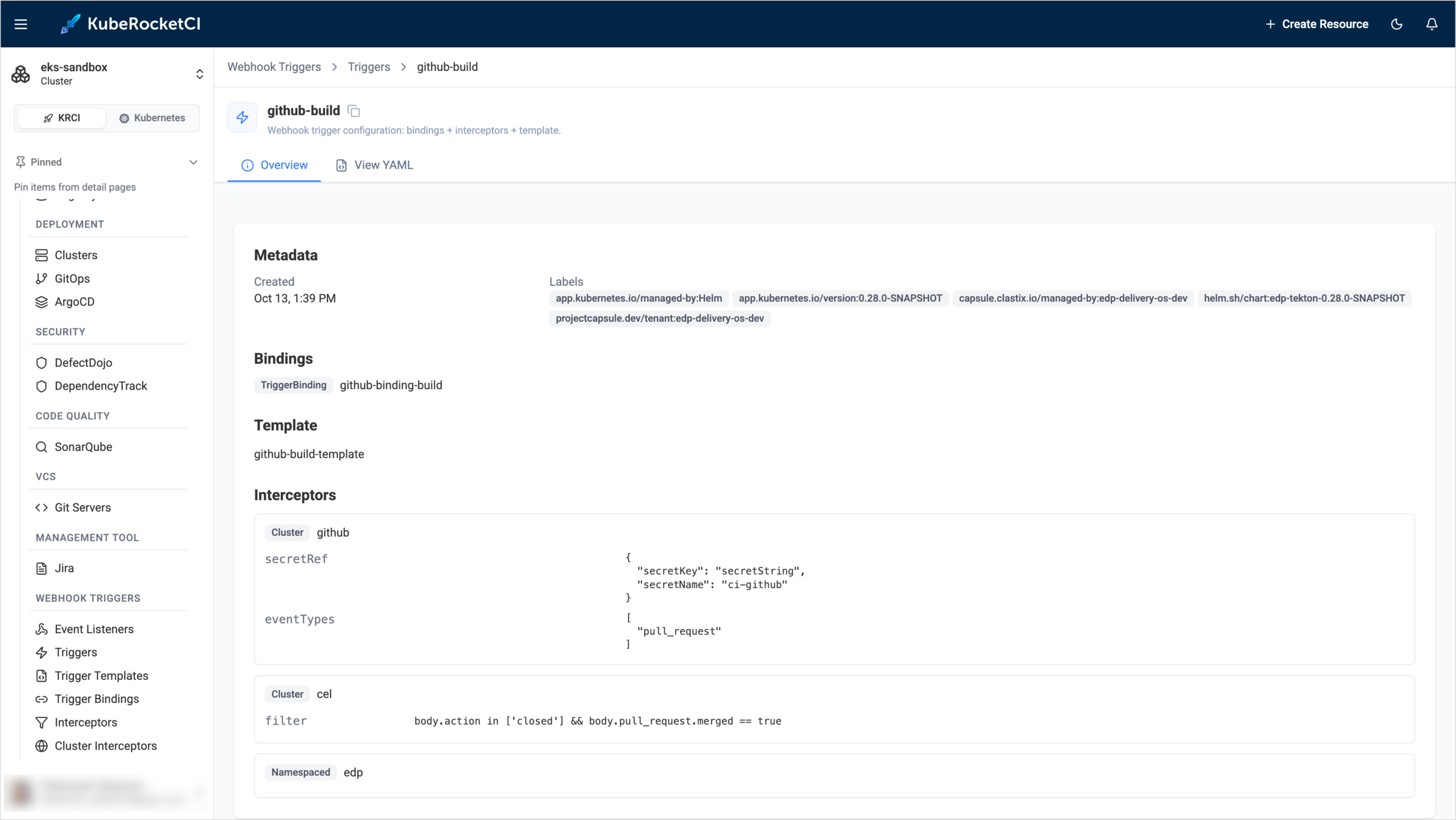
To see the full resource definition, open the View YAML tab.
Trigger Templates
A Trigger Template is a blueprint of a Tekton PipelineRun. Whenever an Event Listener fires, the template creates a pipeline run and fills in its parameters with the values from the Trigger Binding. Open Webhook Triggers -> Trigger Templates to view the list.
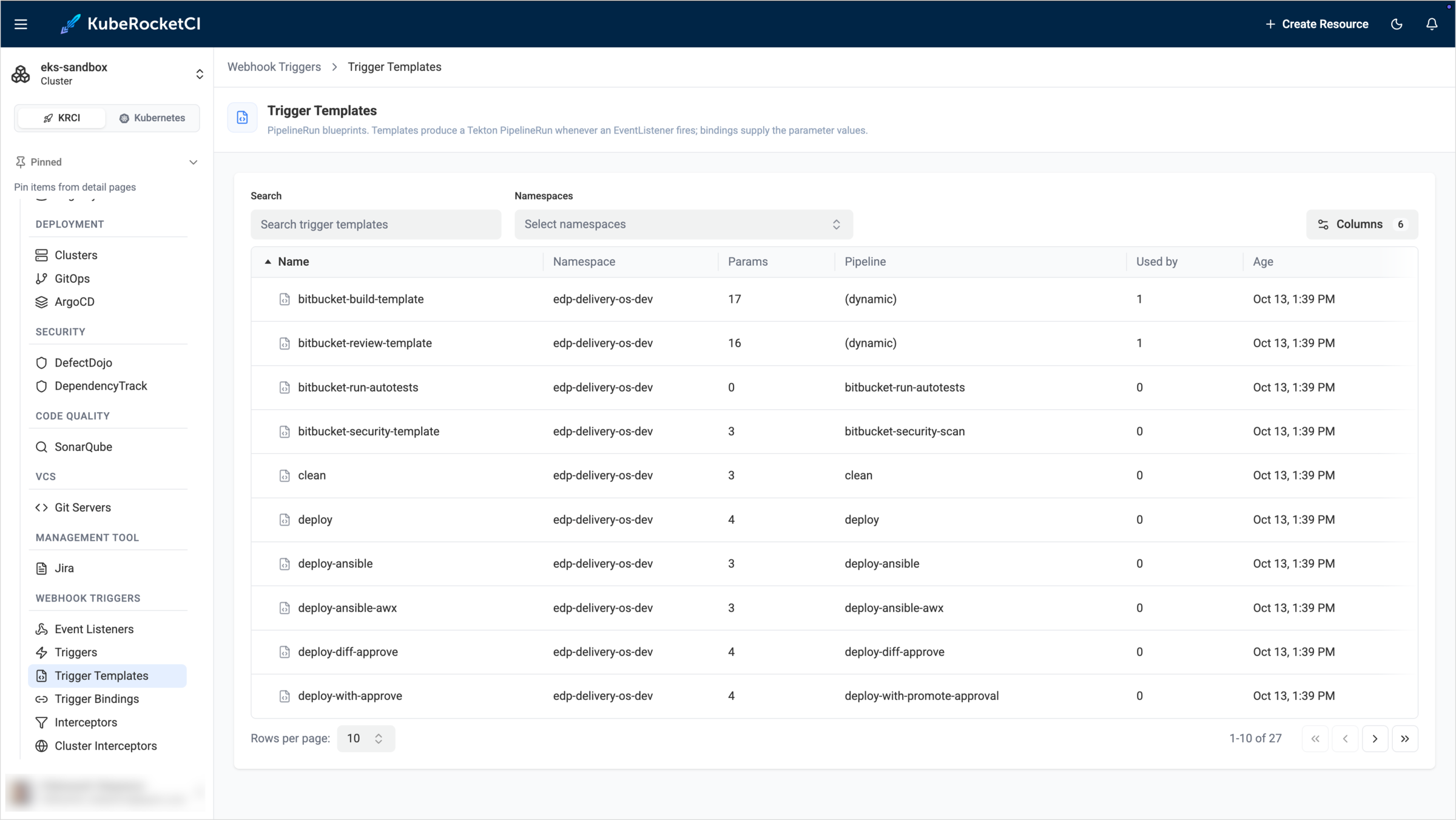
The list contains the following columns:
| Column | Description |
|---|---|
| Name | The Trigger Template name. |
| Namespace | The namespace of the Trigger Template. |
| Params | The number of parameters the template accepts. |
| Pipeline | The pipeline the template runs. The (dynamic) value means that the pipeline is not fixed in the template. It is selected for each codebase branch, and the template takes its name from the pipelineName parameter. The review and build templates for GitHub and GitLab work this way. |
| Used by | The number of Triggers that use the template. Templates with 0 are not referenced by any Trigger. |
| Age | The date and time the template was created. |
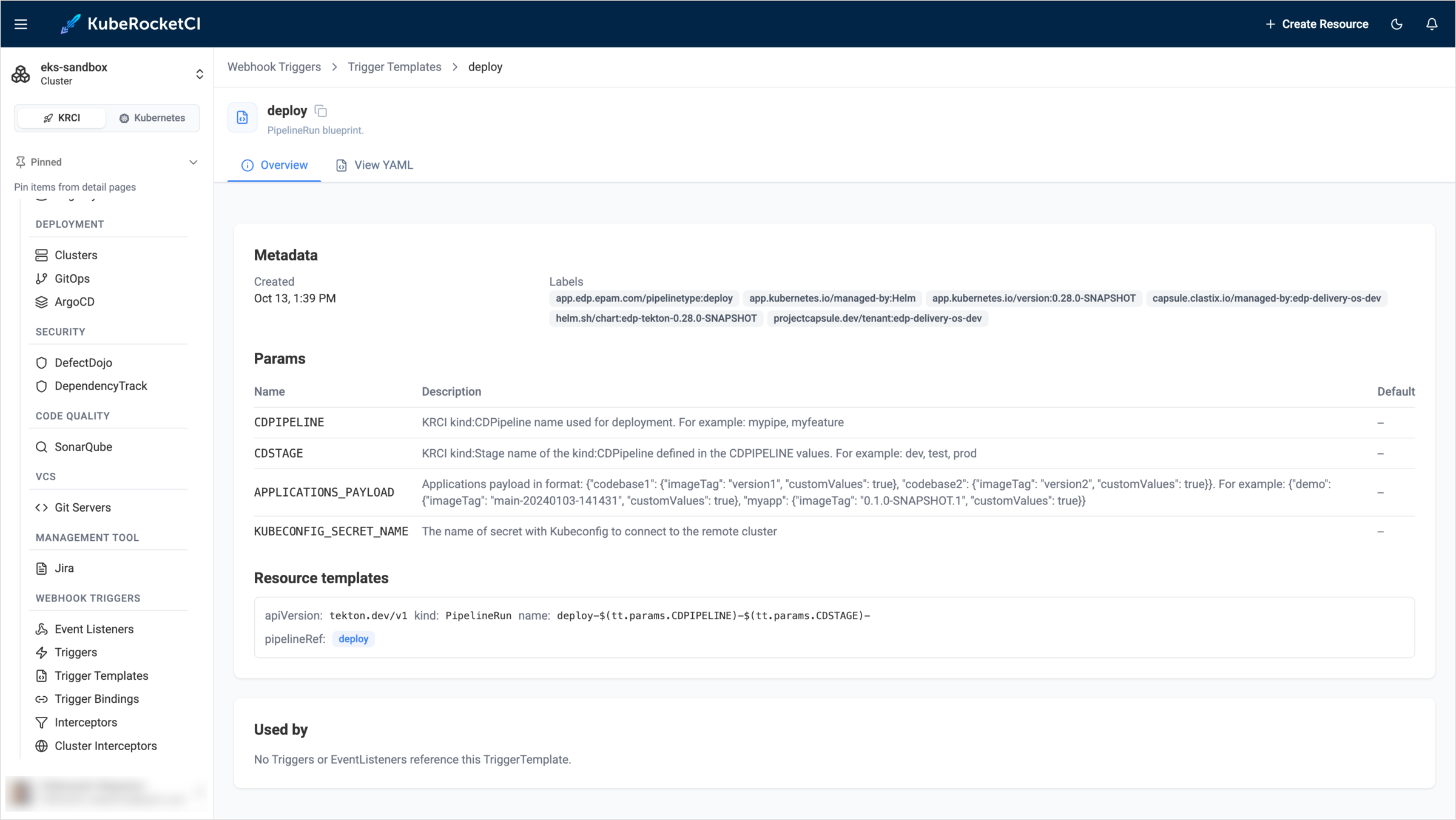
Click a template name to open its details. The Overview tab contains the following sections:
- Metadata: The creation date and the labels of the template.
- Params: The parameters of the template, with their descriptions and default values. For example, the
deploytemplate acceptsCDPIPELINE,CDSTAGE,APPLICATIONS_PAYLOAD, andKUBECONFIG_SECRET_NAME. In the review and build templates, thepipelineNameparameter is the pipeline to run, which the KubeRocketCI interceptor populates from the codebase branch specification. - Resource templates: The resources the template creates. Usually it is a
PipelineRunthat references a pipeline, either by name, as thedeploytemplate does, or through thepipelineNameparameter. - Used by: The Triggers that use the template. If nothing references the template, the section shows No Triggers or EventListeners reference this TriggerTemplate.
Trigger Bindings
A Trigger Binding maps the fields of a webhook payload to the parameters of a Trigger Template. Open Webhook Triggers -> Trigger Bindings to view the list.
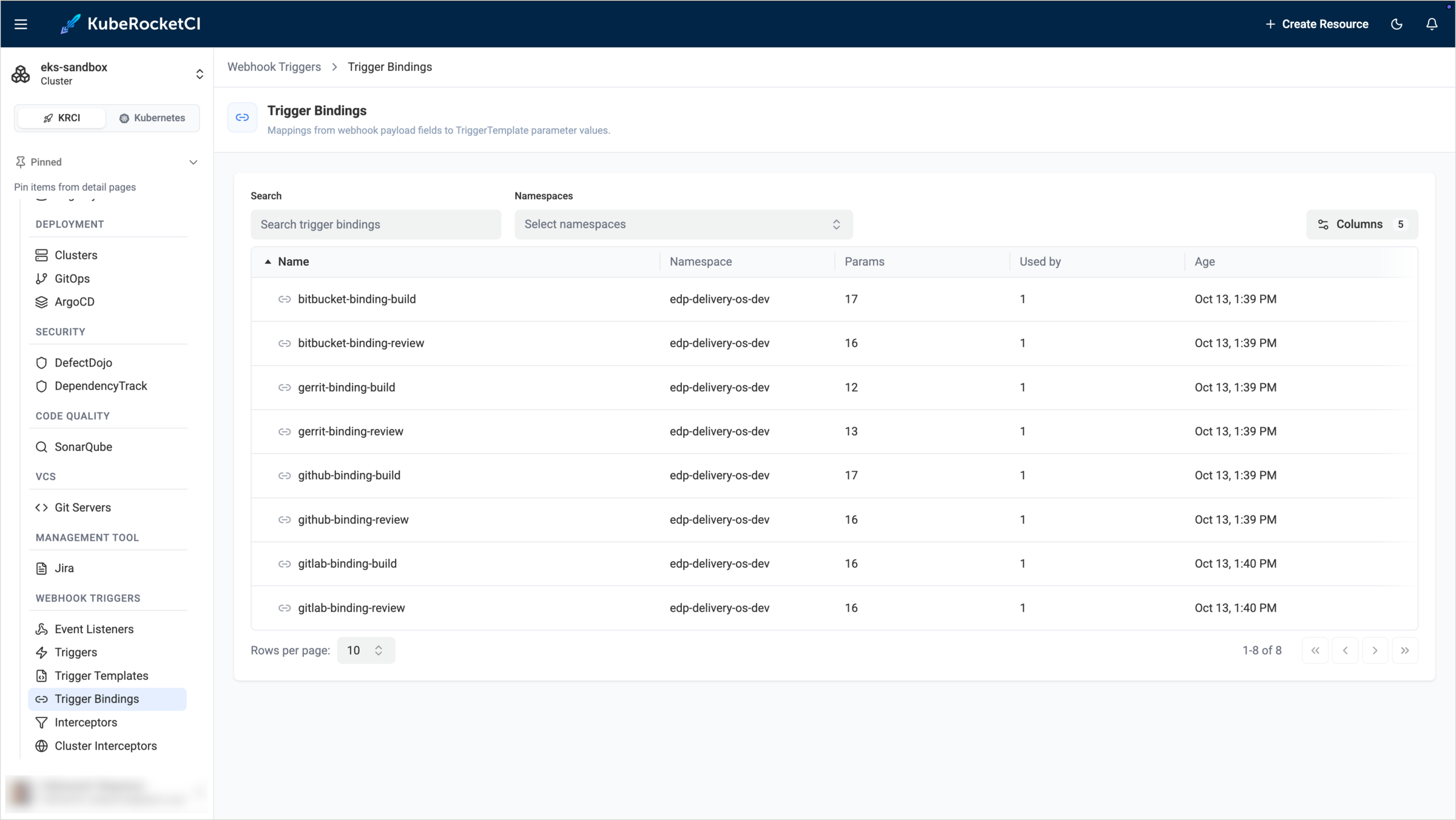
The list contains the following columns:
| Column | Description |
|---|---|
| Name | The Trigger Binding name. |
| Namespace | The namespace of the Trigger Binding. |
| Params | The number of parameters the binding sets. |
| Used by | The number of Triggers that use the binding. |
| Age | The date and time the binding was created. |
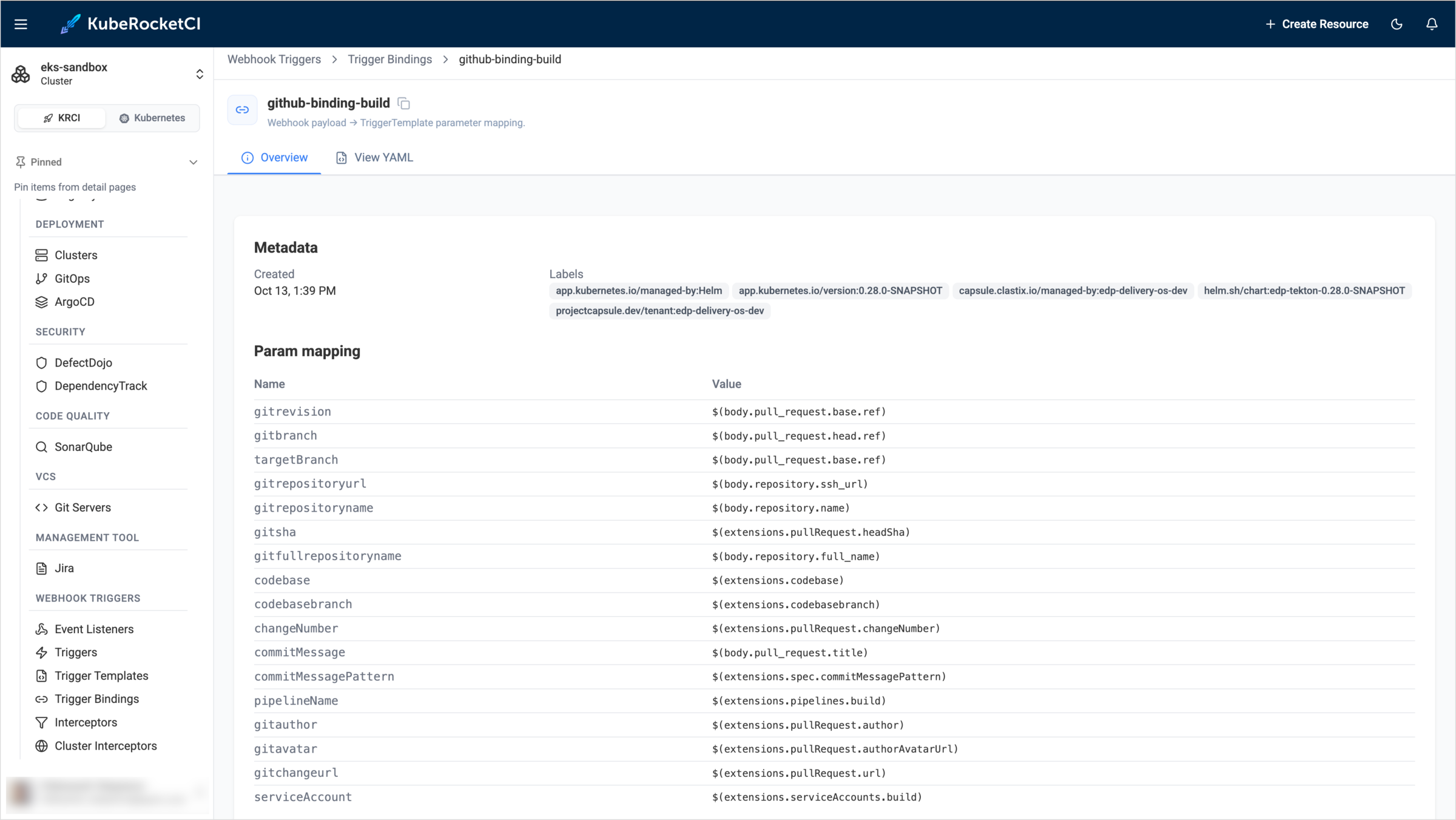
Click a binding name to open its details. The Overview tab contains the following sections:
- Metadata: The creation date and the labels of the binding.
- Param mapping: The name of each template parameter and the expression that provides its value. The
$(body.…)expressions read values directly from the webhook payload. For example,$(body.pull_request.head.ref)is the source branch of the pull request. The$(extensions.…)expressions read values that the interceptors add to the event. For example,$(extensions.codebasebranch)is the codebase branch that the KubeRocketCI interceptor resolved. - Used by: The Triggers that use the binding.
Interceptors
An Interceptor is a namespaced HTTP service that processes a webhook before the binding and the template run. Open Webhook Triggers -> Interceptors to view the list.
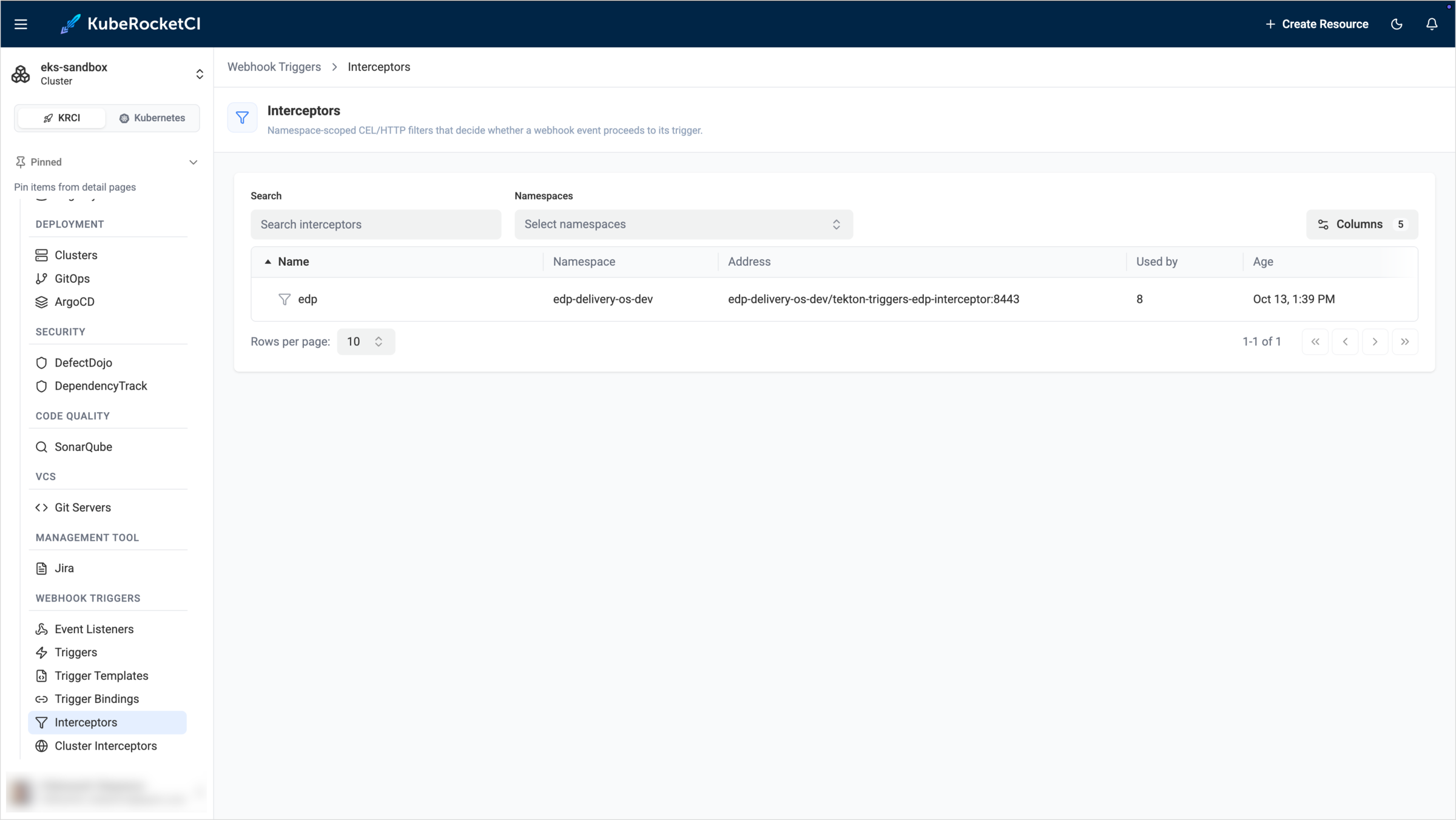
The list contains the following columns:
| Column | Description |
|---|---|
| Name | The Interceptor name. |
| Namespace | The namespace of the Interceptor. |
| Address | The service and port that receive the webhook, in the <namespace>/<service>:<port> format. |
| Used by | The number of Triggers that use the Interceptor. |
| Age | The date and time the Interceptor was created. |
The platform provides the edp Interceptor. It is served by the tekton-triggers-edp-interceptor service from the edp-tekton component. It enriches the webhook payload with the Codebase and CodebaseBranch data, the pipeline name, and the service account for the pipeline run. Triggers for GitHub and GitLab review and build pipelines use it.
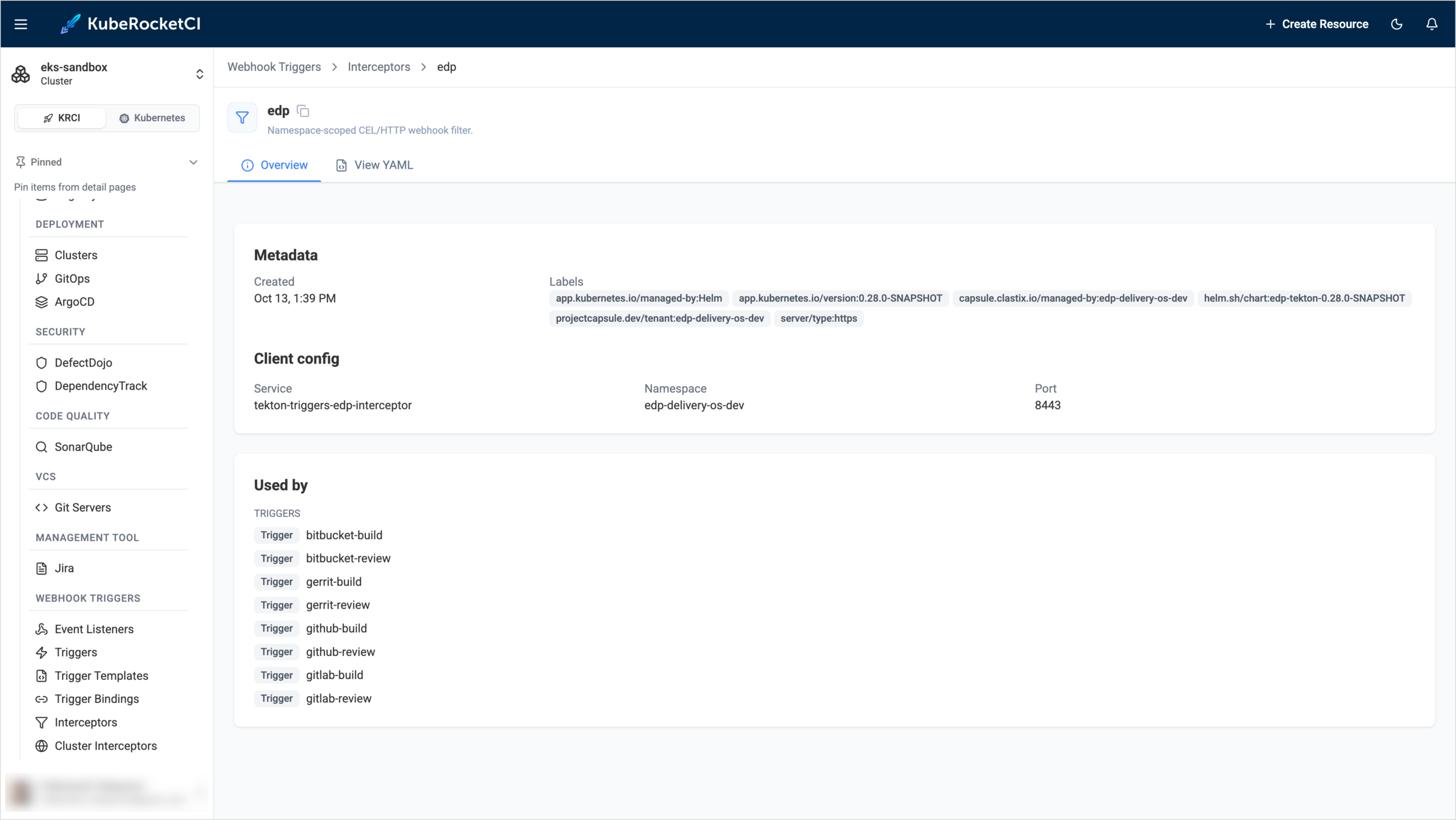
Click an Interceptor name to open its details. The Overview tab contains the following sections:
- Metadata: The creation date and the labels of the Interceptor.
- Client config: The service, namespace, and port the Interceptor listens on.
- Used by: The Triggers that use the Interceptor.
Cluster Interceptors
A Cluster Interceptor is a cluster-scoped interceptor implementation shipped with Tekton Triggers. Triggers refer to them by name and pass their own parameters, for example the webhook secret or a CEL filter expression. Open Webhook Triggers -> Cluster Interceptors to view the list.
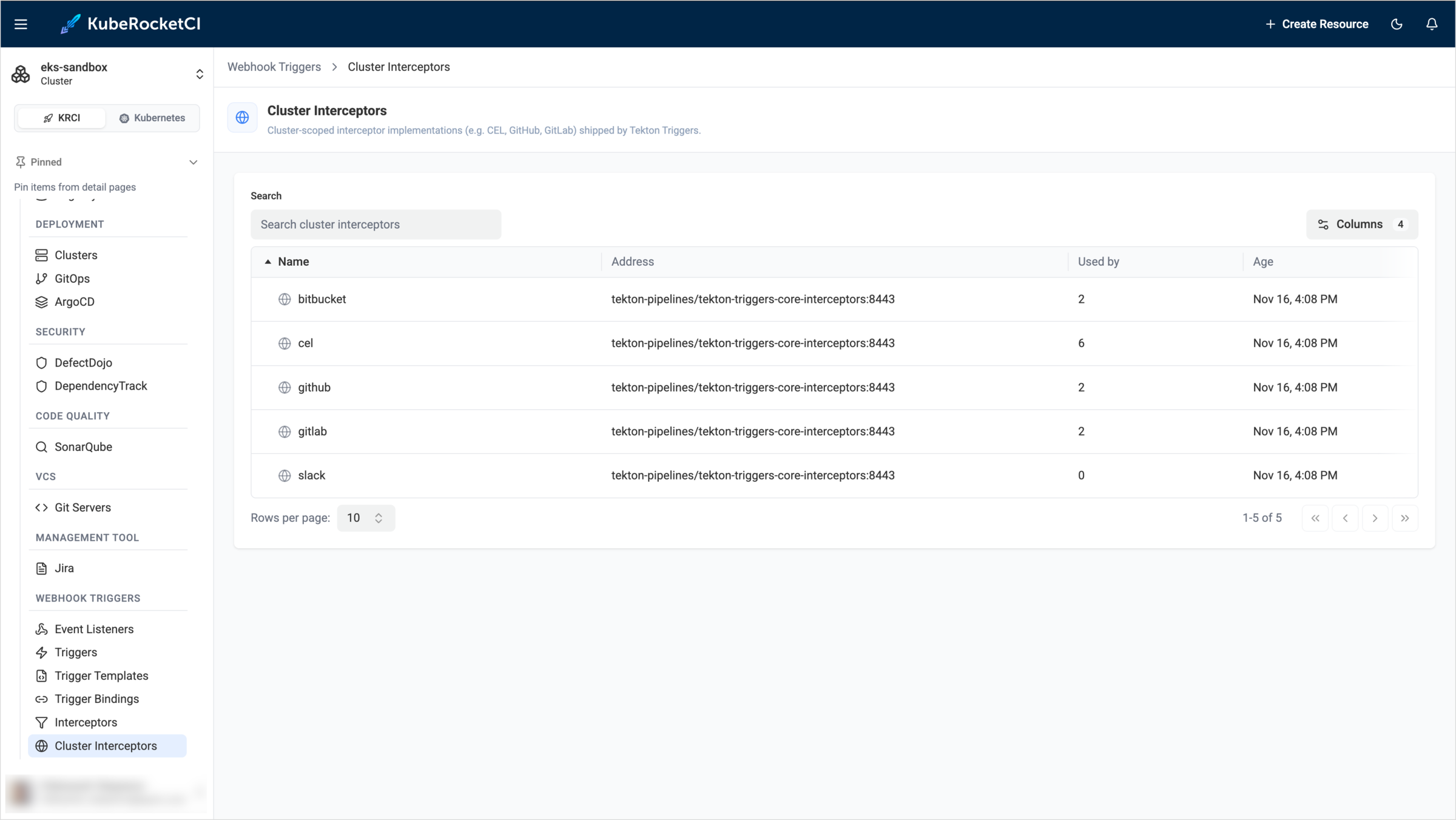
The list contains the Name, Address, Used by, and Age columns, which have the same meaning as in the Interceptors list. Tekton Triggers provides the bitbucket, cel, github, gitlab, and slack cluster interceptors. All of them are served by the tekton-triggers-core-interceptors service in the tekton-pipelines namespace. The cel interceptor evaluates the filter expressions, and the github, gitlab, and bitbucket interceptors validate the webhook secret and the event type.
Click a Cluster Interceptor name to open its details. The Overview tab shows the Metadata, the Client config with the service, namespace, and port, and the Triggers that use the interceptor in the Used by section.
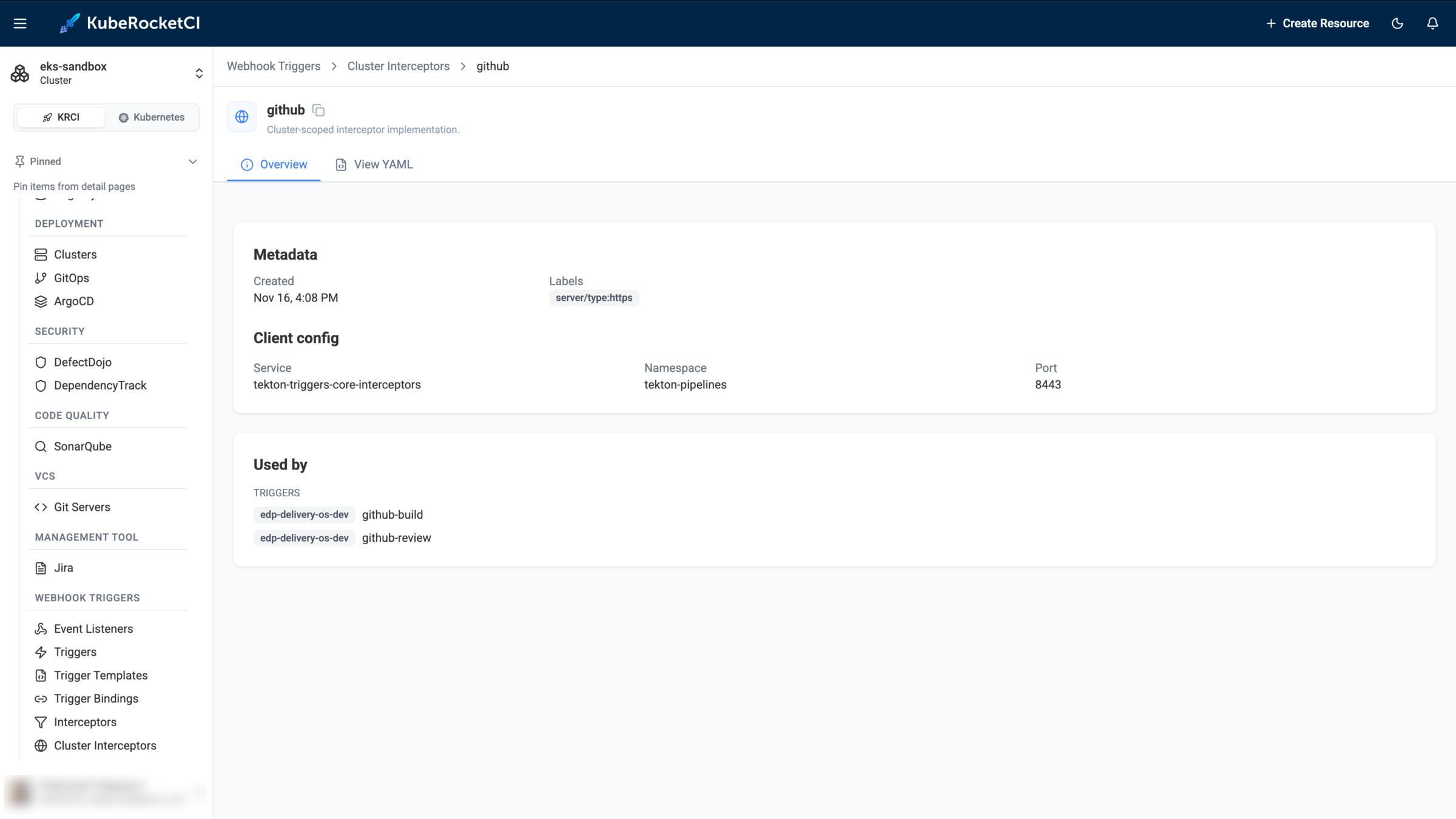
Cluster Interceptors are cluster-scoped resources. If your account does not have permission to read them, the page shows the message Sorry. You don't have permissions to access this data. In this case, contact a platform administrator.
Event Listeners
An Event Listener is the entry point for webhooks. It exposes an HTTP endpoint and passes every incoming event to its configured Triggers. Open Webhook Triggers -> Event Listeners to view the list.
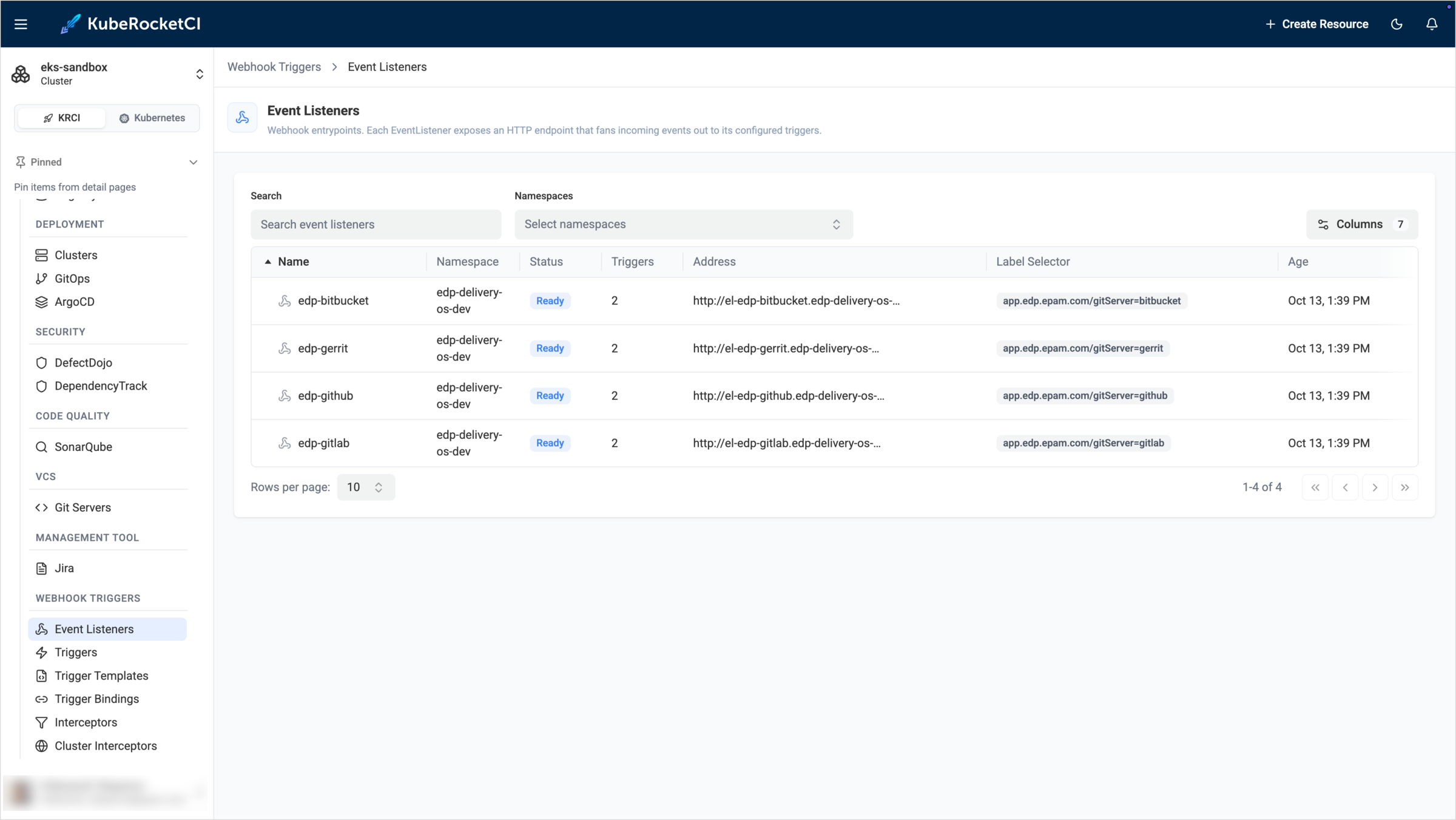
The list contains the following columns:
| Column | Description |
|---|---|
| Name | The Event Listener name. The platform creates an Event Listener for each Git server, for example edp-github and edp-gitlab. |
| Namespace | The namespace of the Event Listener. |
| Status | The state of the Event Listener. Ready means that it accepts webhooks. |
| Triggers | The number of Triggers the Event Listener runs. |
| Address | The in-cluster URL of the Event Listener service. |
| Label Selector | The label that selects Triggers for the Event Listener, for example app.edp.epam.com/gitServer=github. Triggers with this label run on every event the Event Listener receives. An Event Listener without a selector, shown as —, references its Triggers directly. |
| Age | The date and time the Event Listener was created. |
Click an Event Listener name to open its details. The page shows the following information:
- Status and address: The state of the Event Listener and its endpoint.
- Triggers configured: The number of Triggers the Event Listener runs.
- Triggered runs · 24h: The number of pipeline runs the Event Listener started in the last 24 hours.
- Flow diagram: The complete path of a webhook, from the Git source through the Event Listener, Triggers, Interceptors, Trigger Bindings, and Trigger Templates to the pipeline. Use the Horizontal and Vertical buttons to change the layout, and the zoom controls to move around the diagram.
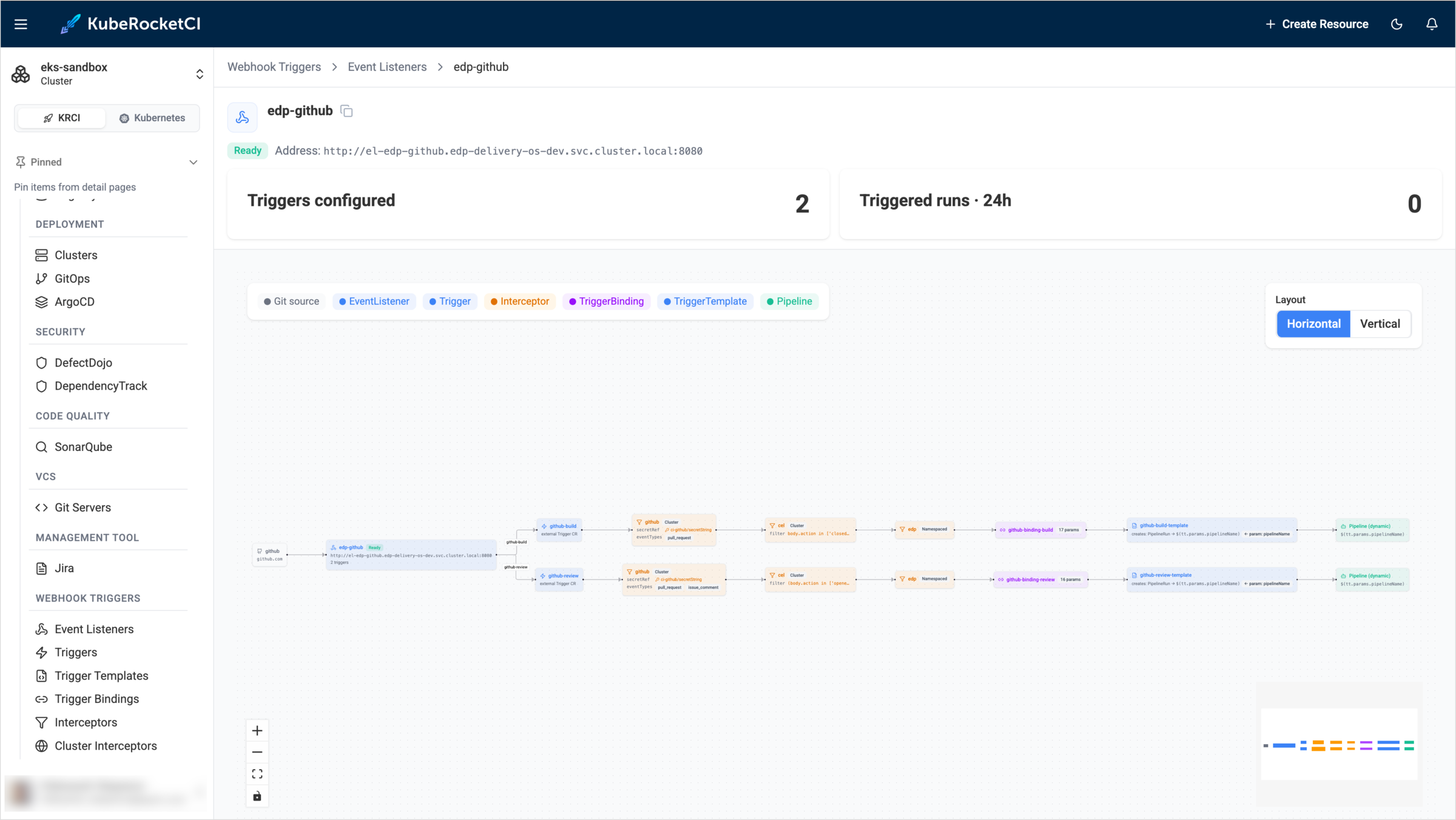
The diagram is the fastest way to answer questions such as why a pipeline did not start after a push or a comment. Find the Trigger for the event and check the interceptor filters on its path. For example, the review Trigger for GitHub accepts the opened and synchronize pull request actions, and comments only from the repository owners, members, and collaborators.