Integrate Dependency-Track
This documentation guide provides comprehensive instructions for installing and integrating Dependency-Track with the KubeRocketCI.
For details on how KubeRocketCI pipelines generate SBOMs with cdxgen and upload them to Dependency-Track, refer to Security Scanning Pipelines.
Prerequisites
- Kubectl version 1.34.0+ is installed. Please refer to the Kubernetes official website for details.
- Helm version 3.19.0+ is installed. Please refer to the Helm page on GitHub for details.
Installation
To install Dependency-Track use KubeRocketCI addons approach.
Configuration
-
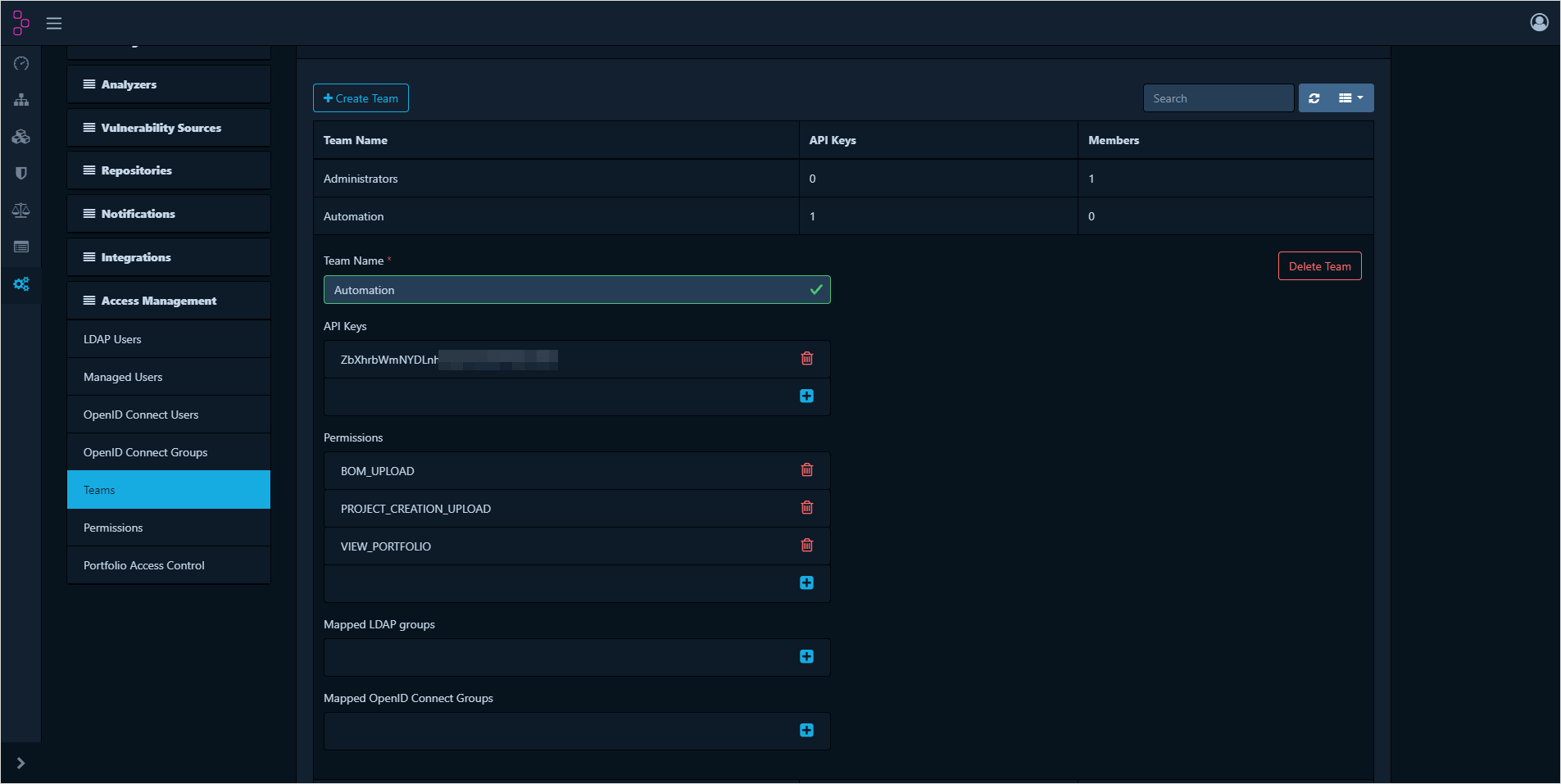
Open Administration -> Access Management -> Teams. Click Create Team -> Automation and click Create.
-
Click + in Permissions and add:
BOM_UPLOADPROJECT_CREATION_UPLOADVIEW_PORTFOLIO -
Click + in API keys to create token:
-
Provision secrets using a manifest, Portal, or with the externalSecrets operator:
- UI Portal
- Manifests
- External Secrets Operator
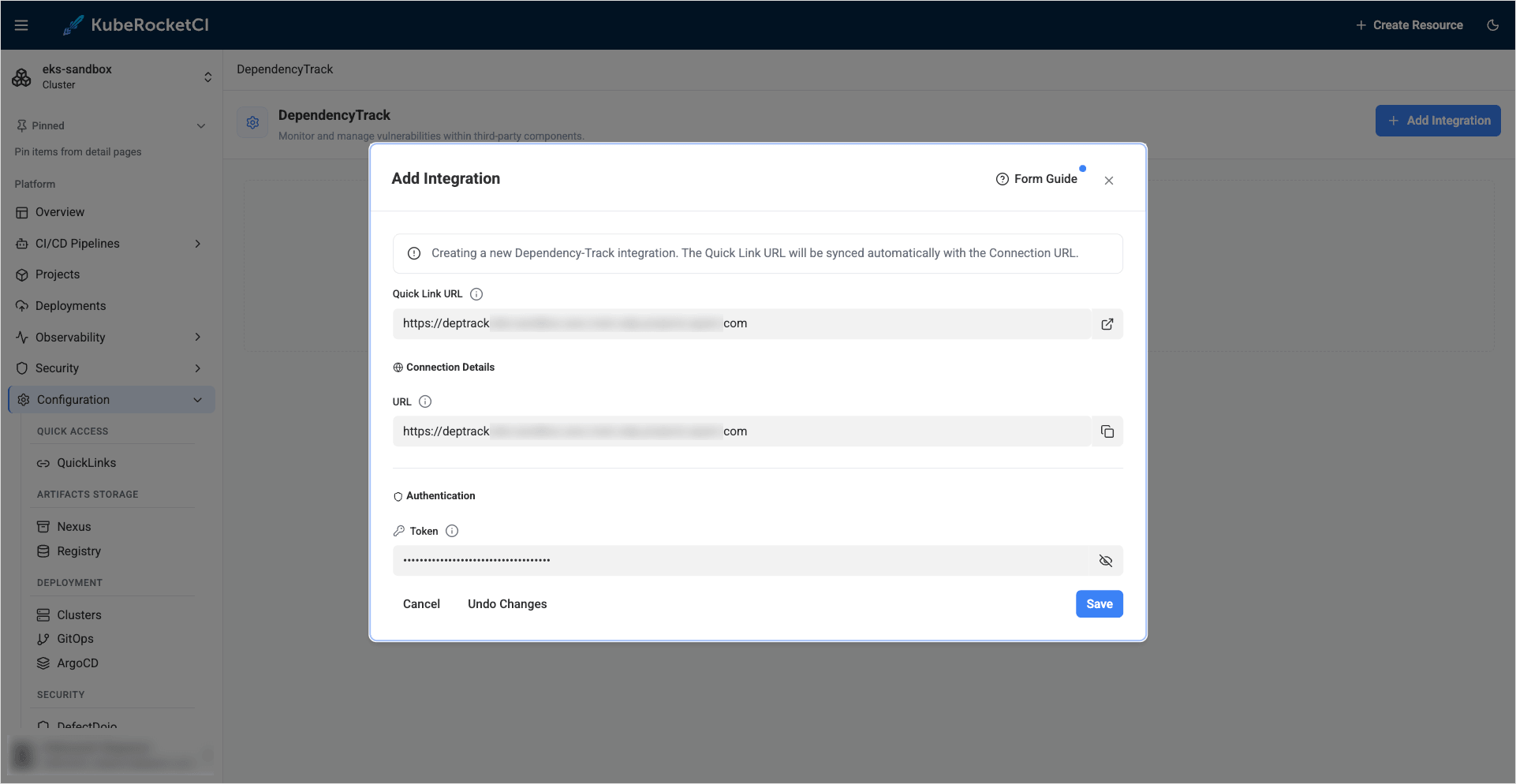
Go to the Portal open Configuration -> SECURITY -> DEPENDENCYTRACK. Click + ADD INTEGRATION fill fields Quick Link URL, URL and Token click the save button.
apiVersion: v1
kind: Secret
metadata:
  name: ci-dependency-track
  namespace: krci
  labels:
    app.edp.epam.com/secret-type: dependency-track
    app.edp.epam.com/integration-secret: "true"
stringData:
  token: <dependency-track-token>
  url: <dependency-track-api-url>
type: Opaque
Store Dependency-Track URL and Token in the AWS Parameter Store with the following format:
"ci-dependency-track":
{
  "token": "XXXXXXXXXXXX",
  "url": "https://dependency-track.example.com"
}
Go to the KubeRocketCI Portal -> Configuration -> Security -> DependencyTrack see the secret managed by the Managed by External Secret:
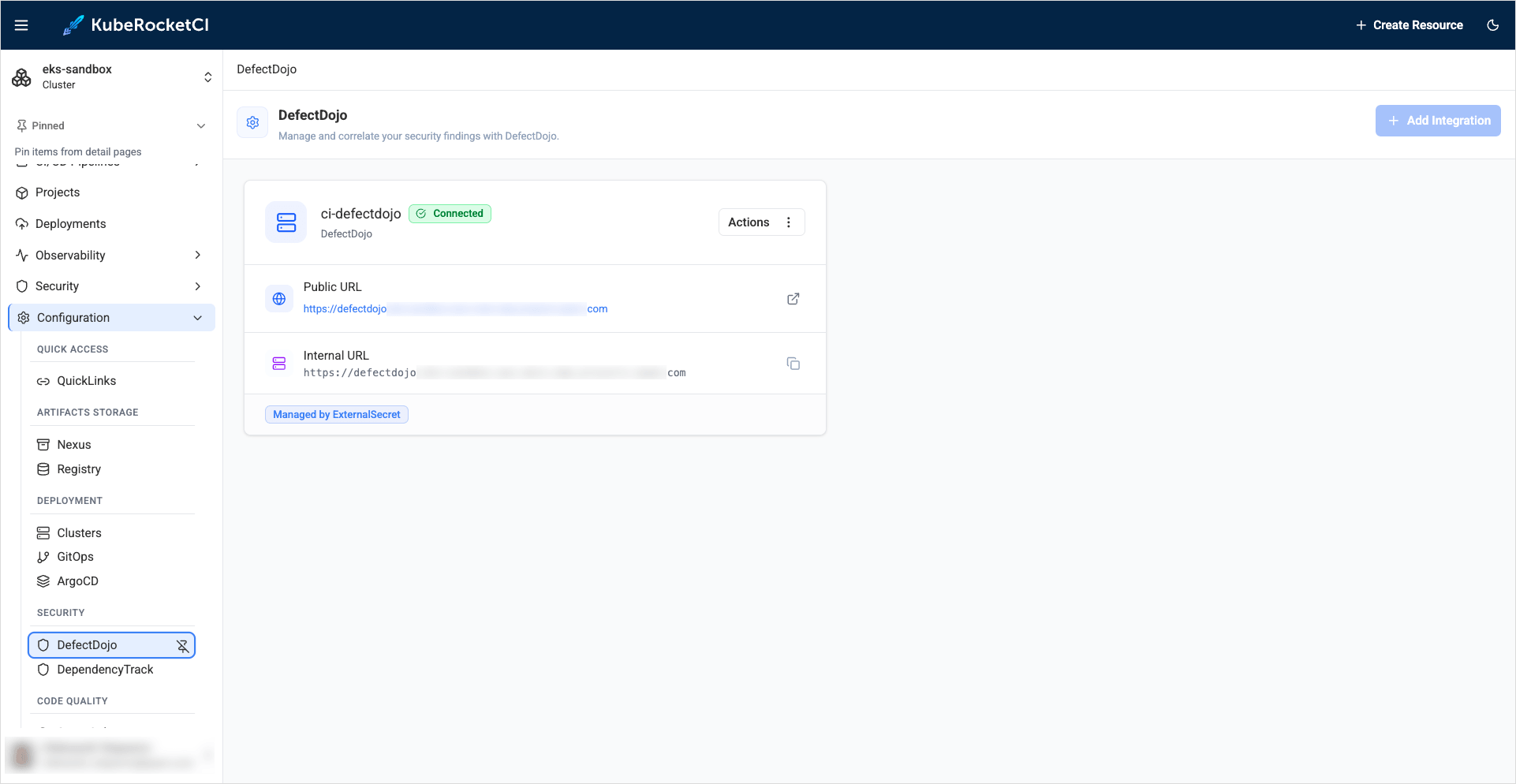
More detail on External Secrets Operator Integration can be found on the following page
The ci-dependency-track secret is used by the security pipelines to upload SBOMs.
Configure the KubeRocketCI Portal
The KubeRocketCI Portal and the krci sca CLI commands read Dependency-Track with a separate, read-only API key. The pipeline key above is not enough: Dependency-Track requires VIEW_VULNERABILITY to list findings and VIEW_POLICY_VIOLATION to list policy violations, and answers 403 without them.
-
Open Administration -> Access Management -> Teams. Click Create Team, name it
krci-portal, and click Create. -
Click + in Permissions and add:
VIEW_BADGESVIEW_POLICY_VIOLATIONVIEW_PORTFOLIOVIEW_VULNERABILITY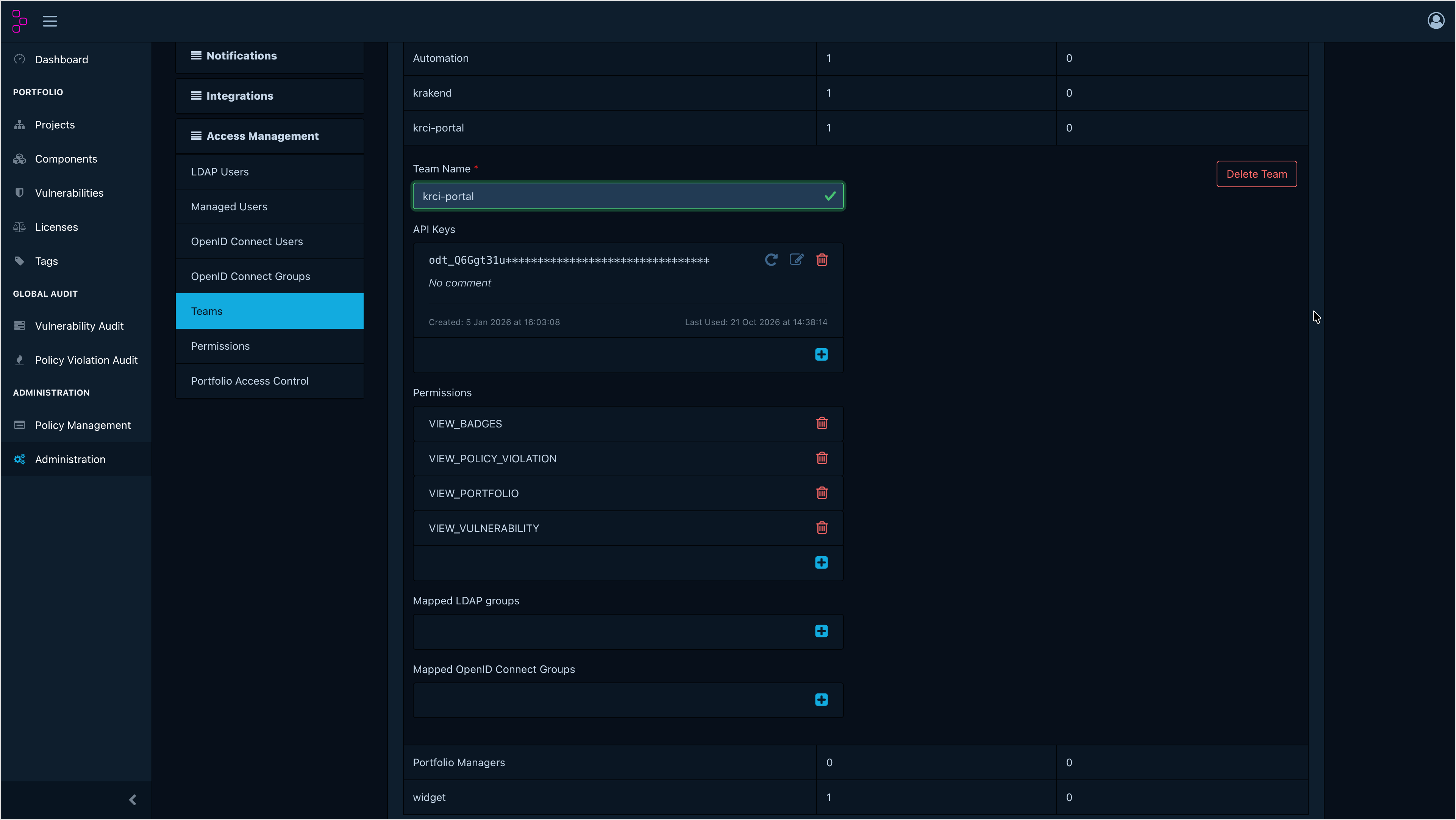
-
Click + in API keys to create an API key for the team.
-
Set the Dependency-Track URL in the
krci-portalvalues:krci-portal:configEnv:DEPENDENCY_TRACK_URL: https://dependency-track.example.com# Optional: browser-facing URL, when it differs from DEPENDENCY_TRACK_URLDEPENDENCY_TRACK_WEB_URL: https://dependency-track.example.com -
Add the API key to the Portal secret as
DEPENDENCY_TRACK_API_KEY(see Create the portal-secret Kubernetes Secret). With the External Secrets Operator, store it under the Portaleso.secretPath. Restart the Portal to apply the key. -
Open Projects -> the project -> Dependencies to verify the widget. The portal looks up the Dependency-Track project by the codebase name and the default branch as the project version, so a security pipeline must run for the default branch first and upload the SBOM. Build and review pipelines do not upload SBOMs. If the tab shows
DEPENDENCY_TRACK_URL environment variable is not configuredorDEPENDENCY_TRACK_API_KEY environment variable is not configured, set the missing variable and restart the Portal. For other errors, see Dependency-Track Project Not Found and Dependencies Tab Shows Zero Vulnerabilities.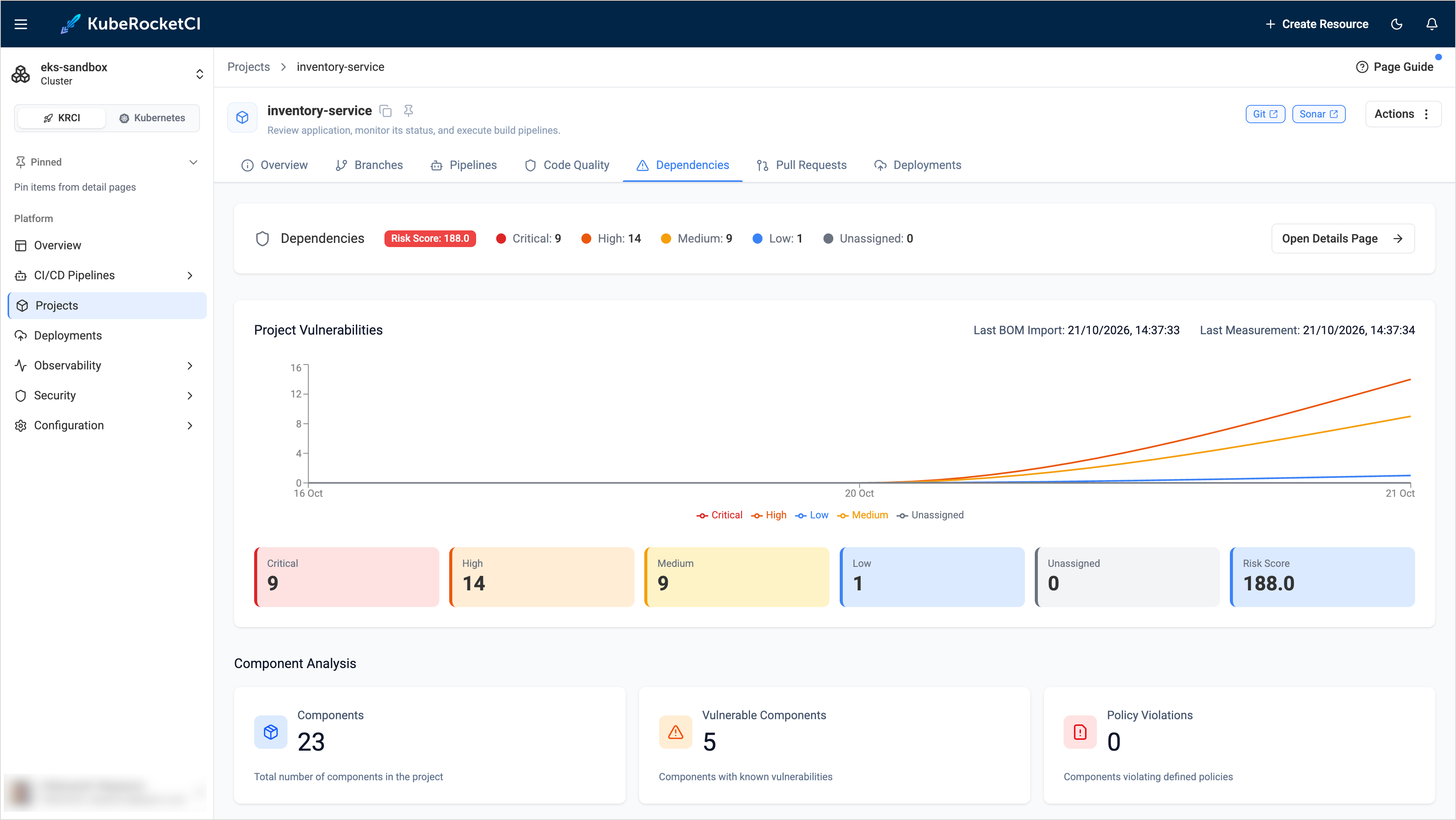
-
Verify the integration:
krci sca listlists the Dependency-Track projects, andkrci sca findings <codebase>lists the findings of a codebase after its first security scan.
Enable Vulnerability Analysis
Dependency-Track shows vulnerabilities only when an analyzer matches the components of an SBOM with known vulnerabilities. Without a working analyzer, the Dependencies tab shows the components but zero vulnerabilities.
-
Open Administration -> Analyzers and make sure that the Internal analyzer is enabled.
-
Enable the Sonatype OSS Index analyzer and fill in the Registered email address and API token fields. Create the token in your Sonatype account on the Sonatype Guide token page.
-
Run a security pipeline for a codebase and open its Dependencies tab after a few minutes. The analysis runs asynchronously.
If the vulnerabilities do not appear, see Dependencies Tab Shows Zero Vulnerabilities.